/

HubSpot

Find all information related to a deal

Find all information related to a deal

Find all information related to a deal

You can use this feature to quickly get up-to-date information on associated contacts, companies, notes, and tasks in HubSpot without needing to log into your CRM.

You can use this feature to quickly get up-to-date information on associated contacts, companies, notes, and tasks in HubSpot without needing to log into your CRM.

George Levin

·

Telegram account warming activity heatmap showing optimal message distribution schedule for account preparation

You will need a messaging app connected to your Hints account.

  1. In your connected messaging app, use a voice command to ask for the deal's information. For example, say Show me everything on the Sam Rosen deal.

  2. Review the detailed summary provided by the Hints bot. The message will contain all relevant data and links for the deal, including associated contact details, company information, notes, and tasks.
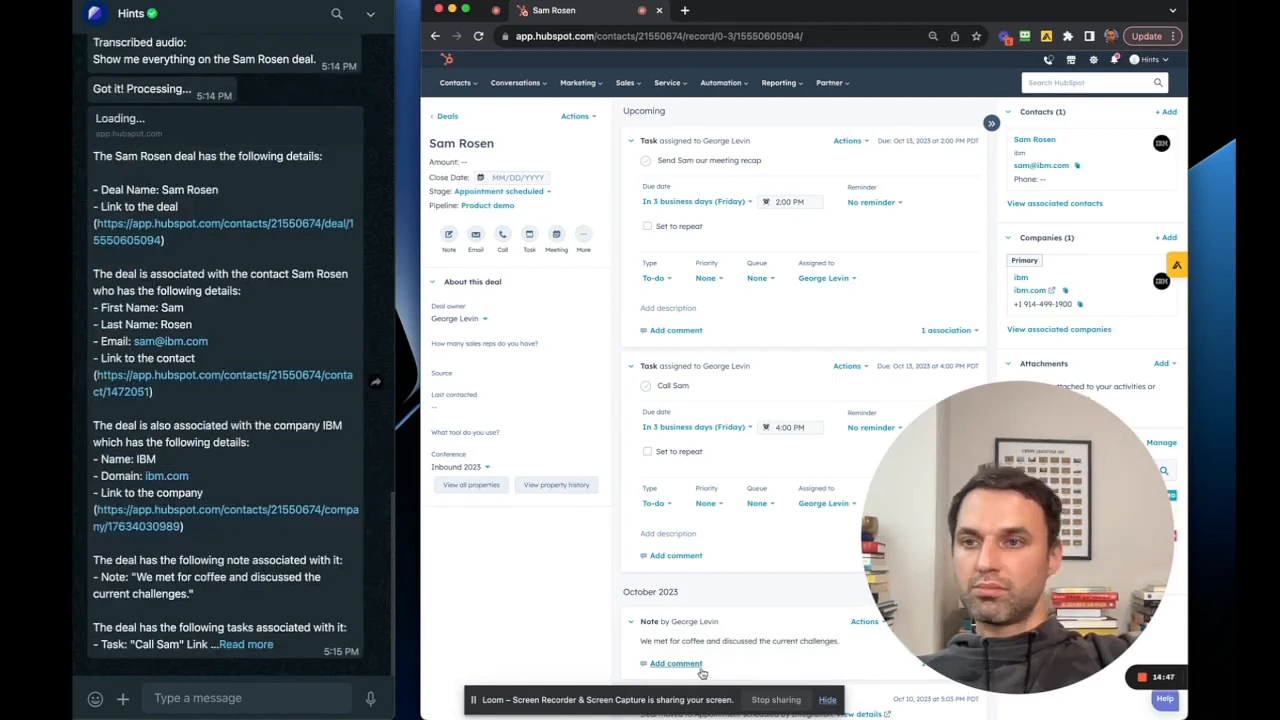

A messaging app interface showing a detailed summary for the Sam Rosen deal, including links to the deal, contact, and company, along with associated notes and tasks.

Summary

Retrieving a deal summary allows you to access a comprehensive overview of a deal's status and history instantly. This feature centralizes key information from your CRM into a single message, ensuring you are always prepared and informed, whether you're on the go or in a meeting.