/

Pipedrive

How to Find Deal Information in Pipedrive with a Voice Command

How to Find Deal Information in Pipedrive with a Voice Command

How to Find Deal Information in Pipedrive with a Voice Command

Instead of manually searching your CRM, you can use a simple voice command in your messaging app to get the answers you need. You will need a messaging app, such as WhatsApp, connected to your Hints account.

Instead of manually searching your CRM, you can use a simple voice command in your messaging app to get the answers you need. You will need a messaging app, such as WhatsApp, connected to your Hints account.

George Levin

·

You will need a messaging app, such as WhatsApp, connected to your Hints account.

  1. Open the chat with the Hints AI assistant in your messaging app.

  2. Use the microphone icon to record a voice message with your question. For example, ask, "Who is my main contact in the IBM deal?"


The user records a voice message in WhatsApp asking for the main contact of a specific deal.


  1. Send the voice message to the assistant.

  2. Review the assistant's reply. The bot will provide the information you requested in a text message, along with a direct link to the deal record in your CRM.
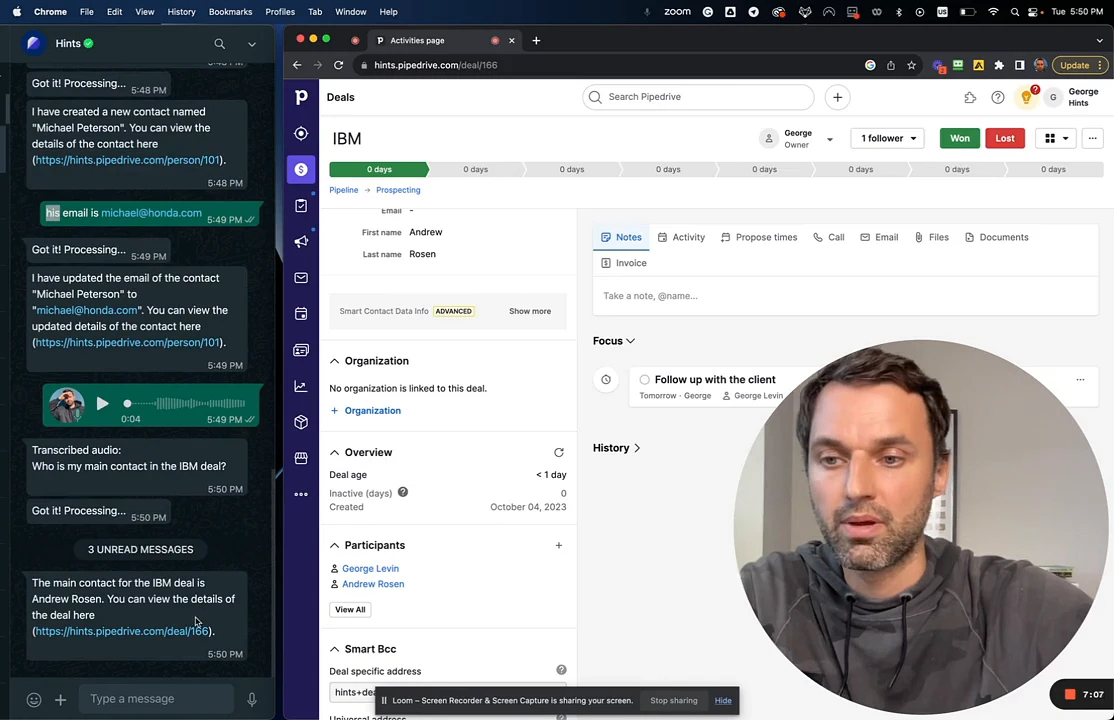

The AI assistant's text response in WhatsApp, identifying the main contact for the deal and providing a link.

Summary

This article explains how to use voice commands to ask the Hints AI assistant for specific details about your CRM deals. This functionality enables you to retrieve key information, like contact persons, hands-free and directly from your messaging app, saving time and improving your workflow.