George Levin
·
You will need a Hints account connected to your Pipedrive account and a messaging app like WhatsApp.
Open your messaging app and navigate to your chat with the Hints AI assistant.
Tap and hold the microphone icon to start recording your voice command.
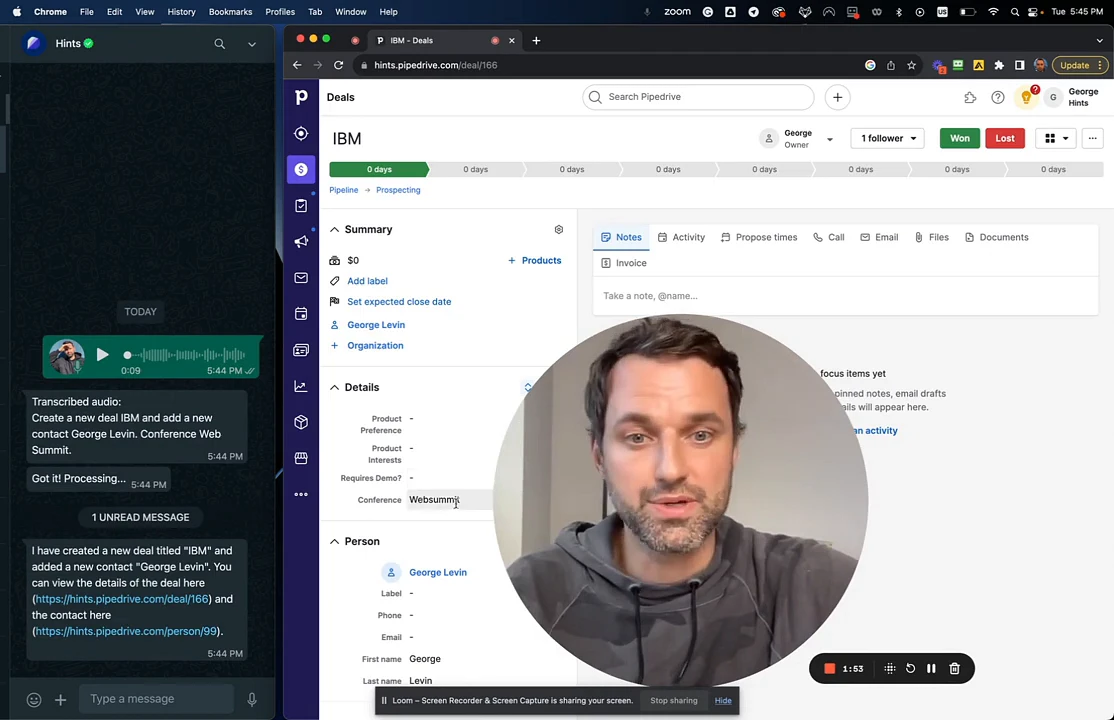
State your command clearly, including the deal title, the new contact's name, and any other field information you want to add. For example: "Create a new deal IBM and add a new contact George Levin. Conference Web Summit."

Release the button to send the voice message. The assistant will process your command and confirm that the records have been created.
Open your Pipedrive account to view the new information. The new contact will appear in your People list.

Click on the deal to view its details. You can verify that the new contact is linked and all fields, including custom ones like Conference, are correctly populated.
Summary
Use a single voice command in your favorite messaging app to simultaneously create a new deal and contact in Pipedrive. This feature streamlines your workflow by instantly capturing and linking critical sales information, including custom fields, directly after client interactions.